Test Player
 What is the allotted time for the exam?
The duration of your exam depends on the specific test you've registered for. All the details, including the exam length, can be found in the email sent to your registered address with the subject line "Online JSAT exam booking details." If you require any further assistance, feel free to contact Pearson’s support team.
What should I do if I need to reschedule my exam due to unforeseen circumstances?
If unforeseen circumstances arise and you need to reschedule your exam, you’ll likely need to reach out to the Pearson VUE support team for assistance. They can guide you through the process and check your eligibility for rescheduling. Be sure to reach out as soon as possible, as there may be specific timeframes or policies around rescheduling.
I signed up for the exam and received a confirmation email with all the information. However, when I tried to log in, I couldn't see any scheduled tests.
You may have logged in before the exam window opened. Please check your current time against the exam schedule.
-
If you don't see the exam under "Active," look in the "Upcoming" section.
-
If the exam has already ended, you can find it under "Expired."
If you're still unable to locate your scheduled exam, contact our support team using the details provided. They’ll be able to assist you further and verify if there's any issue with your exam scheduling.
I've taken a photo of myself with my ID and registered for the exam, but I still can't start the test
The human proctor is likely assisting other candidates in the queue and may still be verifying your image and ID. Please be patient while they work through the process. If you've been waiting for more than 10-15 minutes, please reach out to our support team for further assistance. They can check your status and help ensure everything is on track.
While using the Test and Assessment portal, I encountered an error message that said, "object object." Afterward, when I tried to start the test, I received a notification stating, "This test cannot be initiated now." How can I resolve this issue?
It seems you were inactive on the Test and Assessment portal for an extended period, which caused your session to expire and is preventing you from taking the test. To fix this, close the window or tab and log in again. Once you've logged back in, you should be able to start the test.
I am getting a message like “Number of attempts over/schedule time elapsed.” What steps can I take to resolve this issue?
When you've reached the maximum number of attempts allowed for this test, the screen displays the test validation message as shown below.
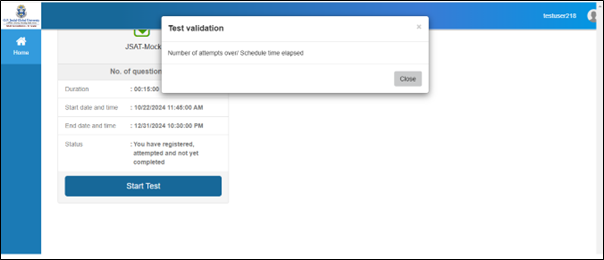
You may need to contact our support team for assistance.